22 November 2026
Made with TaDaeng · tadaeng.com
 ตาแดง TaDaeng
Fill in Form PT 33, the Thai cannabis prescription form, on screen and print it on A4 or save it as a PDF in the official format, or print a blank form to fill in by hand, in Thai or English — free, no sign-up, and your data never leaves your device
A filling aid only — check every detail yourself · the form must be signed by the practitioner · write the document number by hand and keep your own copy as the law requires · nothing you enter leaves this device
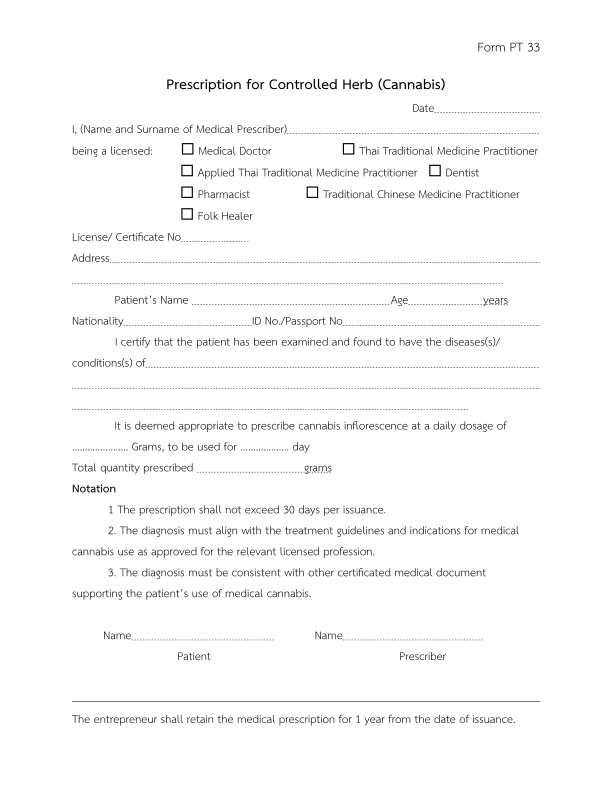
PT 33 is the official cannabis (controlled herb) prescription form. A licensed practitioner issues it to a patient, stating the daily dosage, number of days and total quantity. Per the notes on the form, one prescription covers at most 30 days, and the dispensing premises must keep it for inspection for 1 year from the dispensing date
See a filled-in sample of Form PT 33The 7 practitioner types listed on the form:
PT 27 is the monthly summary of controlled herb (cannabis) dispensed, as one CSV file per month: who received how many grams on which day. The data comes from the PT 33 forms issued that month.
8 columns, with the template's English headers:
order — row number, starting at 1 in every filedatetimeRecord — date and time dispensed (year-month-day hour:minute:second)reportType — report type: a shop dispensing to buyers puts 1idcard_buyer — the buyer's national ID or passport numberlicenseNo_buyer — the buyer's licence number (if any, may be blank)name_buyer — the buyer's full namebdate_buyer — the buyer's birth date (year-month-day)number — grams actually received that dayPT 33 is the official cannabis (controlled herb) prescription form. A licensed practitioner issues it to a patient, stating the daily dosage, number of days and total quantity. Per the notes on the form, one prescription covers at most 30 days, and the dispensing premises must keep it for inspection for 1 year from the dispensing date
PT 27 is the monthly summary of controlled herb (cannabis) dispensed, as one CSV file per month: who received how many grams on which day. The data comes from the PT 33 forms issued that month.
Free, no sign-up — fill in and print right away, or print a blank form to fill in by hand
Nowhere — everything runs in your browser. Prescriber details are remembered on this device; patient details are cleared from the form right after printing. If you choose to keep PT 27, its rows stay in this browser until you delete them
Yes. Press print and choose "Save as PDF" in your browser's print dialog. It works for both the filled-in form and the blank one.
Yes — set the form language to English to get Form PT 33 for foreign patients
Press "Keep PT 27 on this device", then print PT 33 as usual. Every form becomes a PT 27 row. At month end press "Download PT 27 (CSV)", then "Clear PT 27 data" to start the new month. The rows stay in this browser only.
Shops must report PT 27 every month — this page collects your printed forms into a PT 27 CSV for free (kept in this browser). TaDaeng issues PT 33 for every bill and builds PT 27 automatically, with nothing lost. Try it free for 30 days